Dbs101_flippedclass10
What i did
For today’s flipped class, we completed performing simple queries for a transaction to occur.
What i learned
A Simple Transaction Model
Let’s do this transaction in Postgresql.
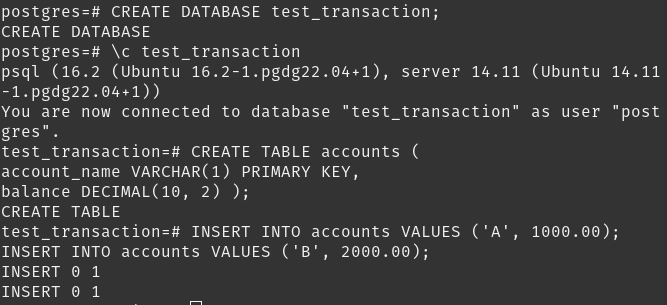
First things first, we create a database to work on and feed it dummy data.
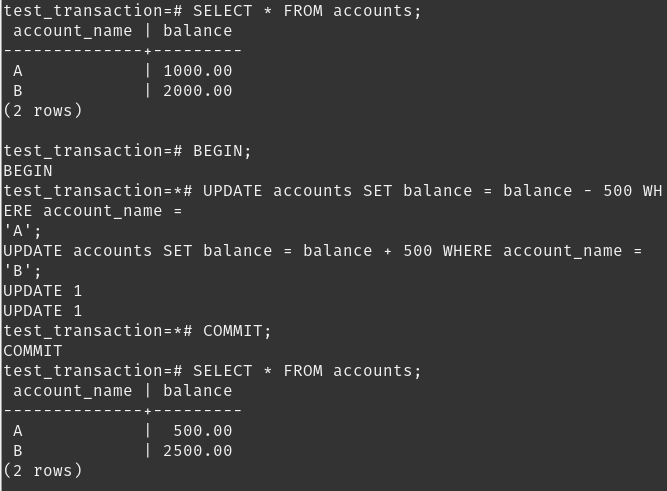
Here’s how these statements work together:
First, you select all accounts to see their initial states.
Then, you start a transaction to ensure that the following operations are treated as a single unit of work.
You update the balance of account ‘A’, reducing its balance by 500.
You update the balance of account ‘B’, increasing its balance by 500.
Finally, you commit the transaction, finalizing the changes to both accounts.
This sequence of operations could be part of a banking system where transferring money between two accounts is represented. Account ‘A’ loses 500 units, and account ‘B’ gains 500 units, effectively transferring 500 units from ‘A’ to ‘B’.
Transaction Model
- Active:
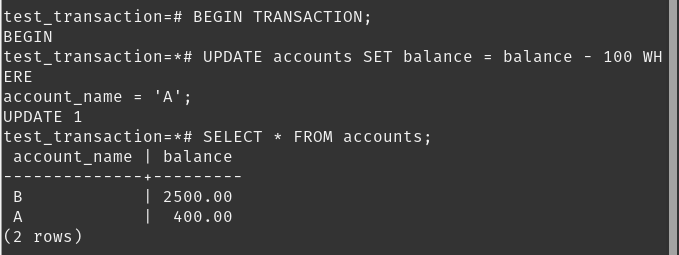
BEGIN TRANSACTION: This statement starts a new transaction. If any part of the transaction fails, the entire transaction is rolled back, leaving the database unchanged.
UPDATE accounts SET balance = balance - 100 WHERE account_name = ‘A’: The balance column of the accounts table for the row where account_name equals ‘A’ is changed. It reduces the balance by 100.
The syntax balance = balance - 100 means that the current value of balance for the account named ‘A’ will be decreased by 100. If the balance was initially 500, after this update, it would become 400.
- Partially Committed
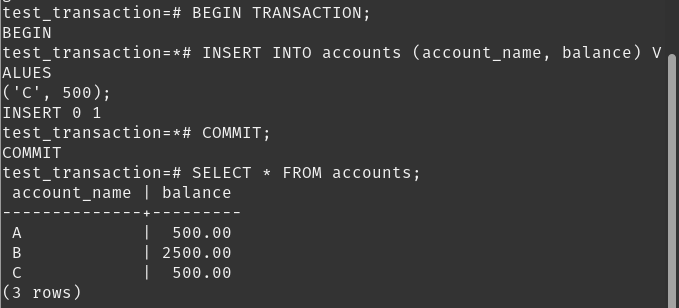
Partially committed transactions refer to a state where a transaction has been started but not yet completed.
In the above example, the transaction is fully committed because the COMMIT; statement is issued immediately after the insert operation, making the insertion permanent.
However, if there were additional operations after the insert that failed or were not included in the provided snippet, and those operations were not followed by a COMMIT; or ROLLBACK;, the transaction would remain in a partially committed state until it is either fully committed or rolled back.
- Failed:
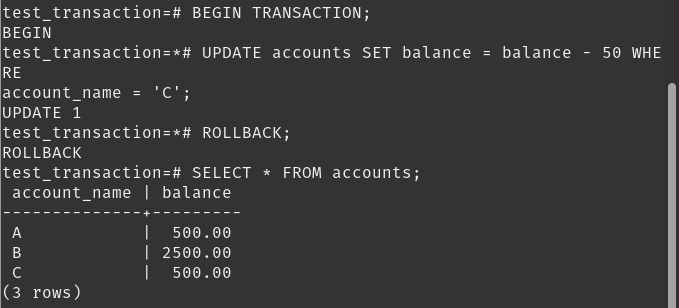
By wrapping the update operation in a transaction and including a rollback mechanism, you ensure that the database remains consistent even if an error occurs during the update process.
This approach is particularly useful in scenarios where data integrity is critical, such as financial transactions or inventory management systems.
- Aborted
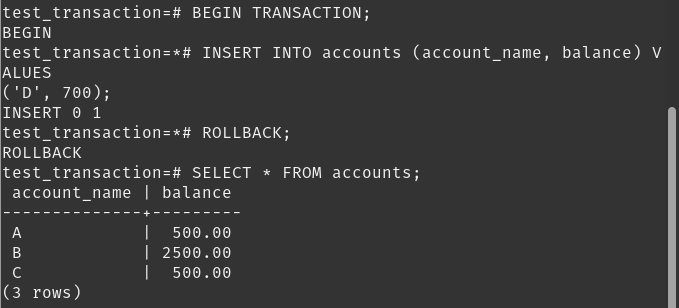
“Aborted” typically refers to a state where a transaction has encountered an error and has been rolled back, meaning all changes made during the transaction are discarded.
The transaction is aborted because the insert operation is simulated to fail, and the ROLLBACK; command is executed to revert the database to its state before the transaction began.
- Committed
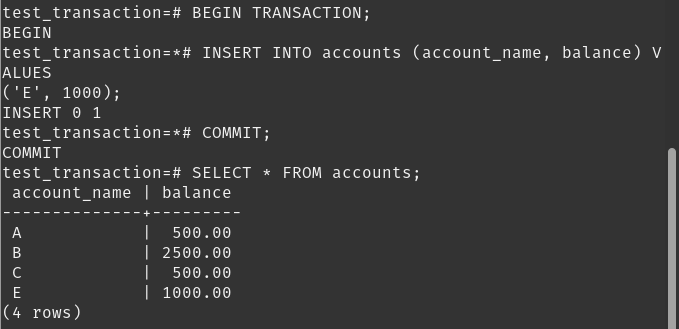
The transaction is committed because the insert operation completes successfully, and the COMMIT; statement is issued, finalizing the addition of the new account ‘E’ to the accounts table.
It allows for complex operations to be managed as a single unit, ensuring that the database remains in a consistent state even when multiple operations are involved.
Conclusion
Transactions are used to ensure that a series of database operations either all succeed or all fail together, keeping the data consistent. Insertion of new records is a common operation within transactions, often used to add new entries to a table.
Committing a transaction makes all changes made within the transaction permanent in the database.Rolling back a transaction undoes all changes made in the current transaction, reverting the database to its state before the transaction began.
This is useful for handling errors or simulating failures. Errors or simulations of errors within transactions lead to aborts or rollbacks, ensuring that the database remains consistent even when operations fail.