Swsctfjournal4
Topic: Kenobi
This is a fun and short ctf challenge based on the Star Wars characters. It involves basic web exploitation and enumeration.
Task 1: Deploy the machine
The first task is to deploy the machine and connect to the VPN. Once the machine is deployed, we can start the enumeration process. To find services running on the machine I am using Rustscan which is faster than nmap.
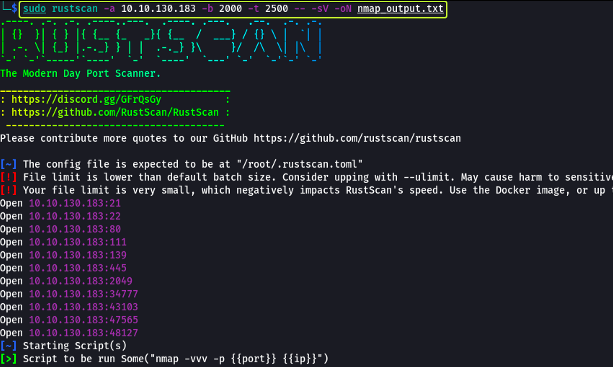
Task 2: Enumerating Samba for shares
There is SMB running on the machine. Start our attack by looking at SMB service.
Nmap gives scan results of the SMB service running on the machine. I can use smbclient to connect to the SMB service and list the shares.
3 shares are found: anonymous, profiles, and share.
There is an anonymous share that allows us to list the contents of the share. I can connect to the share using smbclient and list the contents.
log.txt file is found in the share. I can download the file using the get command.
For downloading the file, I can use the smbget command.
Now that I have the log file, I can read the contents of the file.
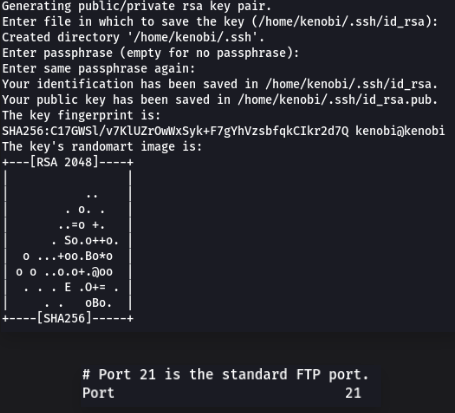
There is SSH private key in the log file. I can save the key in a file and use it to connect to the machine.
FTP is running on port 21.
I found some data in the SMB service. I can look at NFS to see if there is any data in the target.
nmap -p 111 -script=nfs-ls,nfs-statfs,nfs-showmount 10.10.130.183
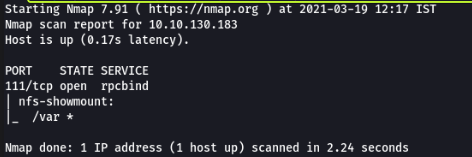
/var directory is served by NFS. I can mount the directory and look at the contents.
Task 3: Gain initial access with ProFtpd
FTP is using ProFtpd. I can connect to the FTP service and look at the contents. Able to confirm using netcat.

Use searchspoilt to find the exploit for ProFtpd. I can use the exploit to get a shell on the machine.
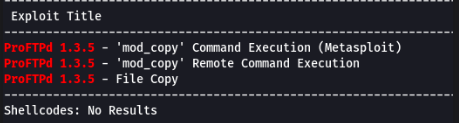
4 exploits are found.
In log.txt file, I found the SSH private key. I can use the key to connect to the machine. I can mount the NFS directory and look at the contents. After mounting when i list the contents, I found a file named id_rsa. I can use the key to connect to the machine.
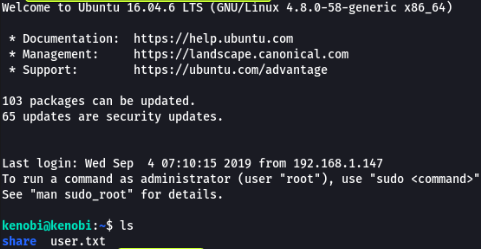
cat user.txt reveals the user flag.
Task 4: Privilege Escalation
Output has binary called /usr/bin/menu. I can run the binary to see what it does.
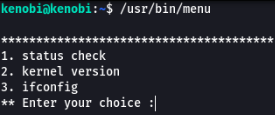
The binary is asking for a password. I can use strings to see if there is any password in the binary.
strings /usr/bin/menu 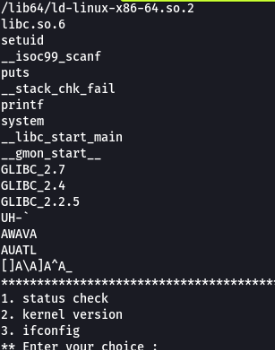
By creating file called curl with the password, I can run the binary and get the root shell.